

This has to be one of the best elearning tools I've come across in 2010. VoiceThread is an user driven presentation tool, witih collaborative text or voice notes that can be added to each slide.
As I've heard someone say already, you have to see it to understand how good this can really be. Play with this embeded VoiceThread below, (yes, bonus points for embedability).
Showing posts with label learning tools. Show all posts
Showing posts with label learning tools. Show all posts
Wednesday, June 30, 2010
VoiceThread for formative assessment


Searching for elearning tools?

Learning Tools Directory : Over 3,000 tools listed
C4LPT - Center For Learning and Performance Technologies
Of particular interest to me is the mobile tools directory, which no doubt will become the fastest growing area in coming years.
Sunday, January 3, 2010
Touch of Genius
The new arrival of touch technology in 2010 could change the way learning technologies are designed and displayed online.
School age learners and above are already natives to 'touch', 'drag' and 'scribble', with the popular use of the iPhone, Kindle and Nintendo DS all involving the heavy use of touch technology.
Now is the time to start road testing your learning spaces on touch devices. With the new mac tablet hitting the stores soon, you can expect a flood of touch devices and with it, an expectation from learners to be able to touch navigate to learn.

Sunday, July 5, 2009
I've been a Twitt!

"What happened to my blog!" "If i tweet, do i blog as well?" "Is twitter the new blogger?"
These questions are echoing around the blogisphere from bloggers who now 'micro blog' with twitter so often, it leaves them wondering if they should 'blog blog' as in blog for real, anymore.
I personally have been on hiatus from my blog and the distance between my last and this post is evidence of my lack of blogging. Twitter IS to blame, (or should i blame the tweeter?), and so is the ability to search the worlds thoughts in real time. Neovet is designed to be a place of pure elearning joy, for those who are always looking for that next innovation that will make training better online.
Twitter therefore is both relevant as a tool to share my blog with others, and dare i say if you don't tweet between blog posts, your blog might as well be offline, and also as a learning tool.
The learning tool element of Twitter, is in the ability to articulate what your learning, share what you learning and as a great search engine. The real time posting element is unique and powerful, especially coupled with hand-held devices.
Twitter as a live group blogging tool at conferences and workshops is worth looking into, but maybe next time... right now i need to tweet my blog if you know what i mean.
Sunday, May 31, 2009
Google Wave & elearning
Well if you feel the hype of Google Wave, then you be feeling it's time to say goodbye to some of your favorite web apps as the Wave seems to be an 'all in one' solution to web communication/collaboration and fun too!.
For learning, it's the real time function, file sharing and embedabillity (new word?), that's got neovet excited. Imagine a mash-up of Skype, Facebook, Twitter, DimDim, iGoogle......you get the picture, prepare to surf the wave late 2009.

Saturday, May 30, 2009
Open Learning for YMIS

Most of the YMIS course content will become open and available in 2009-10 through a 'wiki' like web shell. Each section is built on joomla articles, and you can search content by set categories, search box and a tag cloud. Anybody can seek to contribute by clicking the Do you have a suggestion!, button in the top right corner of the site. The decision to do make content free and available for a 'fee for service' course might be seen by some as unprofitable. Well that's not the point.
Firstly, YMIS course material is both useful for our fee-paying students and the broader community and we believe in sharing the great resources we have with the world, especially if it helps those in youth work. Our 'qualifications' still cost money as does to a degree the mentoring and training support we provide, but there is as an advantage to all involved in an open learning approach to our courses.
Secondly, we are adding value to the YMIS brand, that's no secret, by doing this we are creating a global network/forum for discussion around faith based youth work. WE are also creating pathways to other training and resources apart from our own, so this is a very win-win situation for YMIS.
The URL for this open learning resource will be ymiscentral.com.
Saturday, December 27, 2008
Flow for student planning
http://flowchart.com/features/
This online application for realtime 'recordable' collaborative flow chart design looks fantastic. I can see this being used by students in group projects allowing for more flexibility in planning space and time.
Sent via BlackBerry® from Vodafone
Sunday, November 23, 2008
e listen - modules

Go to this URL to visit the e-listen project:
Dave from Stop21 and I finished this project in 2008 as part of the Australian Flexible Learning Frameworks: Innovative Projects Grant Program.
Here you can see the SCAR Theory in action, also the use of a Flash Story board, Accordian View conten tabs and the use of Google Forms and a Blog to connect our learners to extension content and invite them to give feedback about our product.
Wednesday, November 19, 2008
Find me a good lesson plan
James Dalziel has written an excelent chapter in the new publication from MIT "Opening Up Education",( (available for download HERE
This is a good read for anybody interested in how we can better share content and also teaching processes across the web. As James suggest, there is plenty of shared content, but not many shared experiences of how teachers can use that content to help learners and/or sequence lessons.
There is nothing like a good quality lesson template, that can be used again and again for different lessons just by changing the content but maintaining the teaching process. but Alas, Google away and see if you can find anyhthing worth using.

Tuesday, August 26, 2008
Googles 'Lively' place to chat... and break dance!
Update: Just when we started trialling it, Google pulled the plug, so Google Lively is gone :( sad to say but the good news is New Lively is here to stay thanks to a community of believers.Googles newest and (i think) coolest application is the self contained avatar world of 'Lively'. At first view I thought this would be another endless jump into the abyss of Avatar black holes like 'second life', but i think the advantages of 'Lively', are actually in it's limitations, not in it's applications.
- It is a simple introduction to Avatarian culture for beginners
- Lively keeps your community in closer proximity through meeting 'rooms' rather than whole 'worlds'. Rooms can be linked through hyper linked objects ( I have a magic potplant portal in my first room!)
- I'ts not overwhelming: the user options are kept to basic communication methods of gestures, text chat, and a little bit of fun thrown in for good measure.
It also embeds in CMS nicely such as 'moodle', as a better 'chat' option, you can actually see who is in the chat room for one, but also the extra novelty of making my avatar break dance in front of others takes the cake.
I would like to see the following applications added to 'Lively' for enhanced E-learning.
- A 'real' WhiteBoard, to leave messages on
- Video or audio message app, where users can post a short message
- Quiz, Word Puzzle and Scrabble games
- A timetable app, with upcoming events
- Integrated account to CMS so users don't need to 'sign in' twice
- How about a sit down Space Invaders game too :)
Sunday, July 13, 2008
Google Earth Field Trips
I just discovered that Google Earth can be used in real time presentations to give student an idea of where they are in relation to physical land marks, very useful if you are about to go off campus on a field trip.
For example, I have just sent our Youth Work students on a journey visiting youth services that support AT-RISK youth in the fortitude valley region of Brisbane. Each team was given a set of maps from Where is Dot Com to help them navigate to their respective excursion locations.
I used Google Earth Download
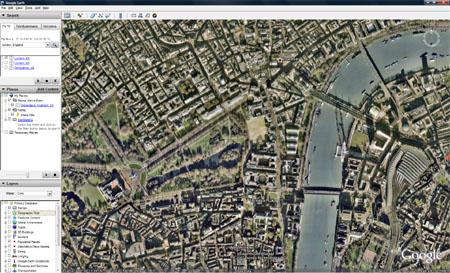
To Give them the bigger picture of the Brisbane area, and pin pointed all the landmarks, so they could easily see how to get there...and see that the distances between each youth service was only small. Further to this with the inclusion of the Street View function on google maps, students can get a view of the venue they are visiting as if standing in the street, making the landmark more recognisable when they get there.
When most of us have google earth on our phones, with gps positioning, orientering will be snap!
Thursday, June 26, 2008
Way Cool
Successful RTO | Emerging technology | Details of project |
Charles Darwin University (NT) | E-portfolios/web 2.0 tools: | The CDU trial will explore e-portfolio access issues and the use of social networking/web 2.0 tools with e-portfolios. The implications of social networking on policy and best practice; and required features of VET e-portfolio systems will also be explored. |
Canberra Institute of Technology (ACT) | Virtual worlds: | The CIT trial will provide VET practitioners with strategies to develop virtual teaching spaces and practices and lower the barriers to incorporating virtual worlds into VET for teachers and learners. |
TAFE Tasmania (TAS) | Video: | The TAFE Tasmania trial will use the Framework's QTImPlayer with 'camera glasses' to enable apprentices and trainees to record video of tasks to provide evidence of their competency. The camera glasses are worn by students to record their activity when doing remote workplace assessment. |
Wodonga TAFE (VIC) | Mobile devices: | The Wodonga TAFE trial will make use of RFID (radio frequency identification) technology to create a self-guided induction tour of a workshop used by metal fabrication and cabinet making students. Similar in concept to the self-guided tours in museums and art galleries, the trial team will use a combination of online, PDAs (personal digital assistants) and RFID technology to create an interactive induction journey through the department. |
Wednesday, May 28, 2008
Top Web Learning Tools
I would tend to agree with most of this list of the Top Learning Tools on the web
Friday, April 18, 2008
i learn

Here is my quick but expanding list of possible applications for ipod learning:
- Podcasts
- Video
- Photos
- i-notes
- Calender
- Task
- Contacts
- i-books
Here is a list of learning tools that could be developed for ipod
- Vlogs [peer2peer learning]
- i-books for integration of podcasts & lecture notes
- Video introductions to units
- Video content, with slides
- Podcast content
- i-notes pdf lecture notes
> Student Orientation
- Podcast, Vcast orientation
- Photos of staff and facilities
- Contacts of admin and trainers
- Calander of important dates
Saturday, March 1, 2008
Workshop "Power 2.0 the User" Links
Examples 2.0
What is Web 2.0?
What is tagging?
What are social networks?
What is a Blog?
What is a Vlog?
What is RSS?
What is cloud computing?
What is mlearning?
Presentation Tools 2.0
YouTube to share video
LifeFrame to make videos
Slide Share to share slides :)
Audacity to record audio for podcasts
Blogger to make your first blog
Other Tools
del.icio.us for great tagging
Delicous Bookmarks for an even better tagging experience
Google Docs for free, collaborative, cloud, office applications
Subscribe to:
Posts (Atom)


 Posts
Posts

